Because the risks of AI browsers outweigh the hype, our Christine Hall uses BrowserOS as a tightly controlled research tool instead of a way to surf the web.
These days I’ve been using BrowserOS, one of the new AI-focused browsers, on an almost daily basis. I never use it for visiting websites, although I did take it for a spin to visit FOSS Force when I first installed it, figuring that was a safe bet.
You might have noticed that many AI-focused companies have recently come out with their own browsers, which all feature agentic AI front and center. I don’t think these browsers are really designed to give users a better browsing experience, but to push AI brands. Google probably started it when it integrated Gemini into search results. One way for competing AI platforms to match that sort of availability, beyond their websites alone, has been to bake AI directly into their own browsers, reducing users’ need to leave for a separate search engine.
OpenAI has Atlas — an AI-native browser utilizing ChatGPT — which it’s been rolling out on a regional basis to its platform’s subscribers. Perplexity has Comet, a standalone AI browser tightly integrated with Perplexity’s answer engine. There are others, with names that might be unfamiliar: Fellou, Sigma, Genspark, and Ecosia all have browsers welded to their own branded AI.
Even browser brands that predate generativeAI are jumping on the bandwagon by adding their own branded AI assistants to their browsers. You can add Microsoft, Opera, and Brave to that category.
BrowserOS’s Difference
BroswerOS is kind of an outlier. It wasn’t created by either a browser or an AI vendor. It’s the brainchild of twin brothers — Nithin and Nikhil Sonti — from Silicon Valley. Nithin came to the table with an AI background, having worked as an ML engineer at Google, and previously at Nvidia. Nikhil was a senior software engineer at Meta, having previously served time at Microsoft and Akamai.

Like most of the browsers on this list, BrowserOS is based on Chromium, with an interface that looks a lot like Chrome. It’s kind of a bring-your-own-AI sort of thing. It comes with ChatGPT, Gemini, Claude, Grok, and Perplexity already integrated, but users can add other AI platforms to the mix.
You can also sign into your own pro or premium accounts if you like. I have an account with Perplexity, so I’ve signed into that account so I can take advantage of its pro features. With the other platforms the browser uses, I just take the free tiers.
I don’t know what you can do with it that you can’t do with a garden variety browser without AI. Mainly, I don’t want to know because I’m not ever going to use it as a browser. Technologists and security experts with a lot more experience than I say that AI-focused browsers aren’t safe… at least not yet.
AI browsers, they say, give agents broad, automated control over tabs, cookies, and logged‑in sessions, meaning that an instruction hidden on a page can get an agent to visit other sites, read emails or calendar entries, send data out, and perhaps spend money using a credit card number you have stored within reach.
As examples, they point to proof‑of‑concept exploits against AI browsers — like indirect prompt injections, which they say indicate a systemic, unsolved problem, not a mere CVE that can be fixed with a one-off patch.
The way I see it, if the cybersecurity experts say AI browsing isn’t safe in the wild west world of the internet, I’m not going to argue. It’s not like I’m losing anything essential by not having AI built into my browsing experience. I’m also opinionated enough to think that if I shouldn’t use AI-based browsers, you shouldn’t either.
So, How Do I Use Broswer OS?
Since I already have a Perplexity account and I can easily bring up and use the free version of any AI brand I want through my non‑AI browser, you might be wondering why I even bother with an AI browser at all, given that I think they’re so dangerous.
Simple. BrowserOS has one little feature I like. To access this feature, I keep the browser on a shared launcher with the rest of the browsers I have installed on my Linux box, so I can open it with a snap of a finger. When I do, I don’t go to Google or DuckDuckGo to search for something and then go to that site. I already have Vivaldi for that, alongside Firefox.
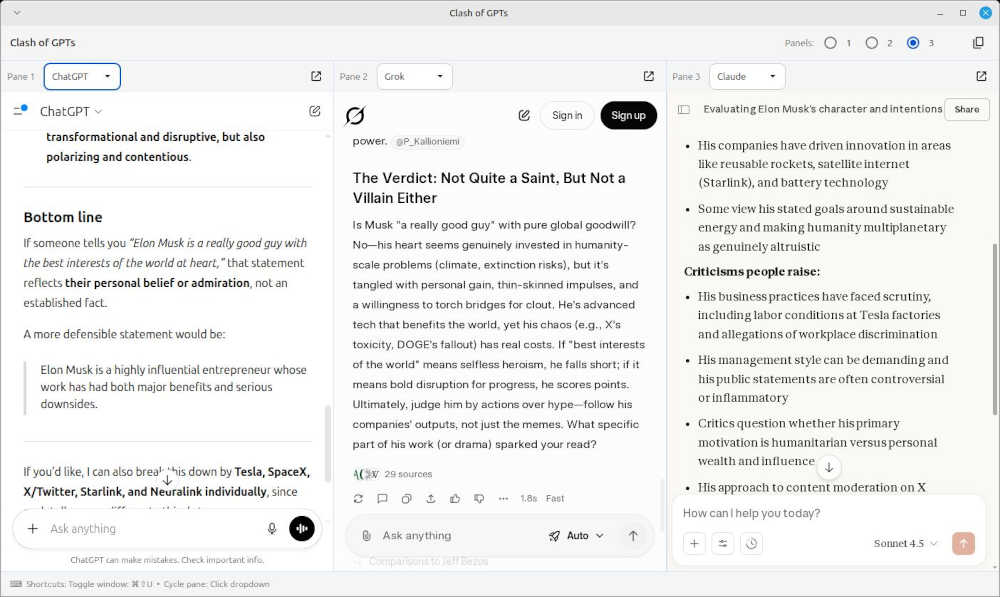
The first move I make after opening BrowserOS is to click on LLM Hub in the screen’s upper left. This brings up another window called Clash of the GPTs, which offers a side-by-side view of three separate chatbots, with a drop-down box in each column offering the choice of ChatGPT, Claude, Grok, Gemini, and Perplexity.
I find this useful when I’m doing research for articles and the answers I’m getting from Perplexity don’t ring true — especially if the platform is having trouble finding a suitable URL to back up its claims. A side-by-side look, using the same prompt for each platform, gives me the opportunity to discern actual facts from untruths and mere conjecture. In its current state, AI is capable of all of these things.
Even with these double checks, I still treat all of these answers as leads, not truth; anything important gets checked against the primary sources they cite before it makes its way into an article.
I used to use Gemini CLI alone for this purpose. If I began to suspect that Perplexity was going wonky and offering answers that were something other than factual, I’d open a terminal, bring up Gemini CLI, and ask it the same question. After a while, I began to realize that Gemini is one of the platforms that Perplexity uses and started dialing up other chatbots online to add them to the mix.
A couple of months ago I downloaded and installed BrowserOS to have a look, and when I saw the LLM Hub feature I had one of those Aha! moments that ancient mystics considered valuable. I’ve been using it for that purpose since.

Christine Hall has been a journalist since 1971. In 2001, she began writing a weekly consumer computer column and started covering Linux and FOSS in 2002 after making the switch to GNU/Linux. Follow her on Twitter: @BrideOfLinux