
If you’ve been looking for an app to help you get to know Linux commands, Brief is a great option.
The FOSS Force Linux App of the Week — Brief
Have you ever needed to figure out how to use a Linux command? Chances are good that you probably turned to the manual pages (aka man pages).
Man pages are great, with one caveat… You have to know which command you’re looking for. Sure, if you know the command you want to understand is grep, you can run man grep. But what if you don’t know the name of that command?
You could turn to your favorite search engine and try to discern what the command is from there. Or you could make use of a handy app called Brief.
Brief is an app for browsing Linux command-line cheat sheets. What does that even mean?
First off, Brief is not an app that simply displays man pages in a convenient form. What this app does is get right to the point to show you examples of how to use the command in question.

It’s really helpful.
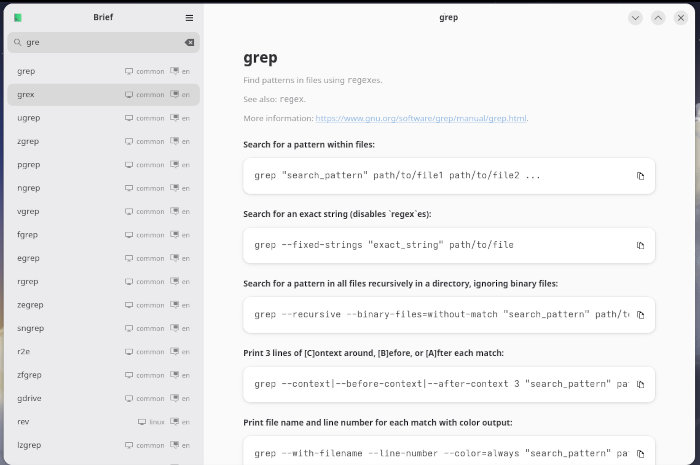
Consider this: You know the command you need is grep, but you don’t want to have to take the time to read through the nitty-gritty of the man page. Instead, you open Brief, locate grep, and view the sample commands to figure out exactly how you need to use the tool.
For instance, I check out grep and find eight solid examples of how to use it, such as:
- Search for a pattern within files.
- Search for an exact string (disables `regex`es).
- Search for a pattern in all files recursively in a directory, ignoring binary files.
And so on.
There’s even a very brief description of what the command does and a link that takes you to the online man page (at gnu.org).

I see Brief as an ideal tool to help those who are new to the CLI get up to speed quickly. No, Brief doesn’t give you an in-depth look at a command, but when you only need to see the “how” and not the “why,” this app really shines.
It’s also open source, released under GPLv3 or later.
Installing Brief
Brief is available as a Flatpak app, so it can be installed on any distribution that supports the app framework. If your system isn’t prepared for Flatpaks, you can remedy that by following the directions in the FOSS Force article How to Make Your Linux System Flatpak Ready, making sure to install the Flathub store.
After that, all you’ll have to do is run the command:
flatpak install brief
You’ll be given a few simple questions to answer, and the installation will complete.
If your distribution is set up such that the GUI app store supports Flatpak installations, you may be prompted to allow xdg-open to open the app store, at which point you can install Brief with a click.
Using Brief
Brief is incredibly simple to use. Open the app from your desktop menu and you’ll be presented with the main page. In the left sidebar, you’ll find a long list of Linux commands you can search through. If you don’t want to doom scroll through the list, use the handy search feature to find what you’re looking for.
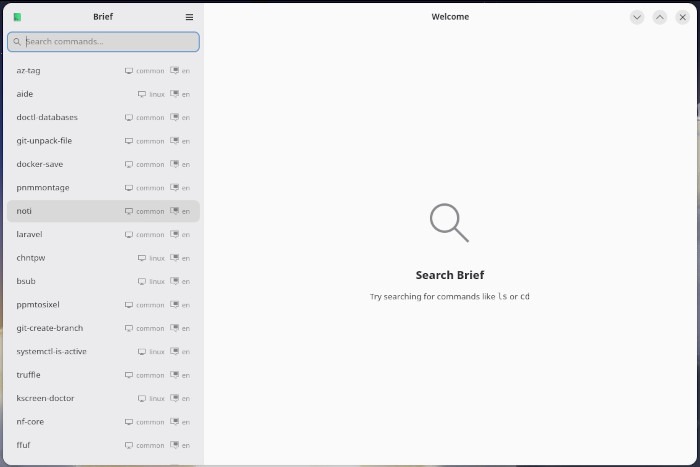
The nice thing about the search feature is that it auto-populates as you type. In other words, if you know the command you’re looking for starts with a “g,” type “g” and all commands that include letter “g” will appear.
Once you find the command that you’re looking for, click on it to reveal the associated page.

As far as preferences are concerned, you can customize the command format so that it includes either long or short arguments (–all vs -a), select your language, and even select an operating system. You can select from Android, Cisco iOS, Common, DOS, FreeBSD, Linux, NetBSD, OpenBSD, SunOS, Windows, and macOS.
For me, I immediately disabled all platforms but Linux, so now only Linux commands appear.
If you need a cheat sheet for Linux commands, Brief is what you want. Sure, you can always turn to an online search, but with Brief, it’s faster, and you don’t need an internet connection to use it.
Give this app a try and see if it doesn’t help you get up to speed with all those Linux commands.
Things I like about Brief… |
Things I don’t like about Brief… |
|---|---|
|
|

Jack Wallen is an award-winning writer for TechRepublic, ZDNET, The New Stack, and Linux New Media. He’s covered a variety of topics for over twenty years and is an avid promoter of open source. Jack is also a novelist with over 50 published works of fiction. For more news about Jack Wallen, visit his website.



It would be useful to always provide the source link(s).
It would help to avoid scams, malware etc., know more about the app/project, get the app by other means (eg. By building it) etc.
Tx for the article.