
Tired of ads, tracking, and doomscrolling? Lagrange lets you explore Geminispace — a stripped‑down, distraction‑free corner of the net.
The FOSS Force Linux App of the Week — Lagrange
Have you ever heard of Geminispace? I hadn’t, until I ran into Lagrange. Actually, there are three open source projects that share the name Lagrange, and of course they’re all on GitHub, just to make things confusing. The one connected to Geminispace is covered under the BSD 2‑Clause License.
Before I get into Lagrange, I should first talk about Geminispace.
What is Geminispace?
For those who’ve not heard of Geminispace, think of it as a text-only internet.
Remember those days? I do.
Imagine having web pages without all the BS, where you can open a page at unheard of speeds, not worry about JavaScript vulnerabilities, not have to deal with ads, and enjoy a consistent experience across the board.

That’s what Geminispace offers.
Now, Geminispace isn’t nearly as widely adopted as HTTP, and I cannot imagine that it ever will be. After all, what would the masses do without the likes of Instagram? For those of us who don’t depend on social media as a lifeline to our souls, however, the idea of Geminispace is pretty appealing.
The benefits of Geminispace include:
- Improved privacy and simplicity.
- Strict limitations on data transfer.
- A design that makes exploitation more difficult.
- Promotes a DIY-compatible content delivery system.
- It’s fast.
- It’s easy to read.
- Distraction-free.
Ironically enough, this old-school-looking and feeling technology is actually new(ish). Geminispace started in June 2019, and although adoption has been slow and minimal, it’s still chugging along. Those who are old enough to remember the likes of Gopher will truly enjoy Geminispace.
If you’re more interested in using the internet as a tool for learning, and less for socialization and doomscrolling, Geminispace will be right up your alley.

That’s where Lagrange (the app not the ZZ Top song) comes in.
What is Lagrange?
Lagrange is an open source Geminispace client that is lightweight, simple, and fast. Lagrange behaves like a traditional browser (while looking rather old-school) and even includes some similar features, such as bookmarks, some themes, favorites, identities, tabs, and more.
You can install Lagrange from Flatpak, so it can be added to most Linux distributions. If you’ve not installed and configured Flatpak, make sure to check out “How to Make Your Linux System Flatpak Ready.”
Once you have Flatpak configured and working, you can install Lagrange with the command:
flatpak install flathub fi.skyjake.Lagrange

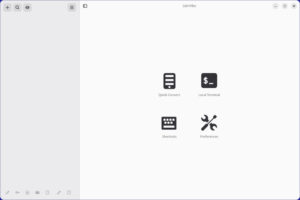
Once you’ve installed Lagrange, you should find it listed in your desktop menu. Open the app, and you’ll see what looks like a web browser from the Netscape Navigator era.
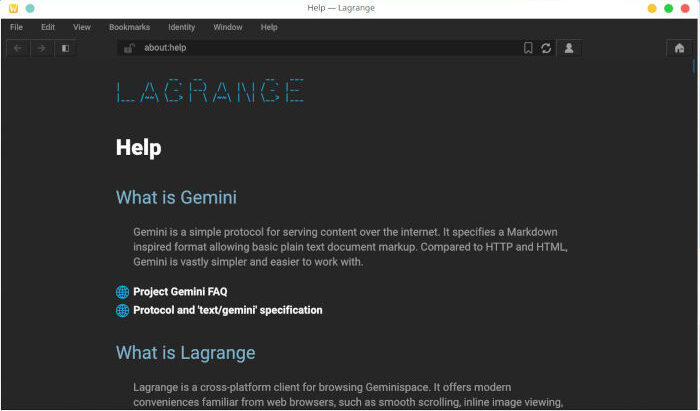
Outside of the look and feel, the first difference you’ll notice when using Lagrange to browse Geminispace is that you don’t use http://; instead, you use gemini://. Easy, right?
The next question is, where do you find geminispaces? After all, you can’t simply type gemini://google.com, because that’s not a thing. Instead, go to gemini://geminiquickst.art and you’ll see an easy-to-read page that serves as a launching point for you to start learning more about Geminispace.
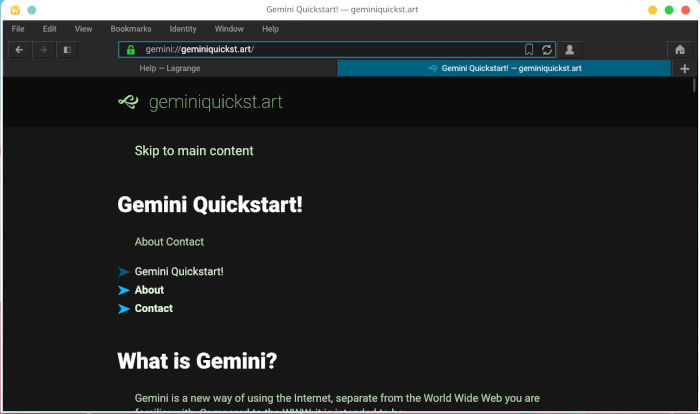
Once a page is loaded, you can scroll through it, click on links, and do many of the things you would do with HTTP pages, only without all the bells and whistles.
Some of the cool Gemini sites I’ve found include:

- gemini://warmedal.se/~antenna/ – news aggregator
- gemini://skyjake.fi/~Cosmos/ – news aggregator
- gemini://gemi.dev/cgi-bin/wp.cgi/ – view Wikipedia via Gemini
- gemini://cdg.thegonz.net/ – a collaborative directory for Gemini spaces
- gemini://bbs.geminispace.org – communication platform
- gemini://gemi.dev/cgi-bin/chilly.cgi/ – weather
- gemini://gemi.dev/awesome.gmi – list of Gemini sites
I’m not saying that Gemini is going to overtake HTTP. There’s zero chance of that. But for those of us who fondly remember the day when the World Wide Web was a place to learn without all of the distractions and doomscrolling, this alternate web space is a real treat. There’s also the likelihood that you might find it challenging to locate enough interesting or useful sites in the beginning. Once you’ve curated a collection of Gemini sites, you’ll find it an absolute pleasure to use.
And if you’re interested in setting up your own Gemini site, you can find a list of available servers to use on the Awesome Gemini GitHub page.
I can’t guarantee that you’ll make Lagrange your new default browser. I can, however, say with confidence that you’ll find exploring Lagrange and Gemini sites to be a lot of fun.
Things I like about Lagrange… |
Things I don’t like about Lagrange… |
|---|---|
|
|

Jack Wallen is an award-winning writer for TechRepublic, ZDNET, The New Stack, and Linux New Media. He’s covered a variety of topics for over twenty years and is an avid promoter of open source. Jack is also a novelist with over 50 published works of fiction. For more news about Jack Wallen, visit his website.
I’m glad people are beginning to notice the small web. I have a gopher hole and a gemini capsule since late 2024. I enjoy these spaces very much. Even my website https://sava.rocks is a mirror of gemini://sava.rocks
I also browse gopher:// and finger://, of course, with LaGrange
Oh wow. This is unexpected. I was looking into gopher/gemini just a week ago, and now I find this website, and this is the third article I see…
Anyway, I tried multiple gemini browsers last week, and Lagrange was one of them. It’s definitely the most “feature-rich” of the bunch, but I’m not sure being “feature-rich” is what a gemini browser should aspire to… Frankly, I didn’t enjoy the experience of *any* of those.
What I actually found myself really liking is just going through some gopherholes using lynx. It’s very simple and very response and really, truly distraction free. I highly recommend anyone here to give it a try. Just do `lynx gopher://floodgap.com` and start exploring (floodgap.com is the unofficial official hub for almost all 21st century gopher stuff).
To continue the slightly critical tone, one of the gopher pages I found was quite a long blog (phlog?) post about gemini, and the guy who wrote that had some pretty good points… Gemini is a cute idea, but it misses the mark. It’s like a spork: Not quite a spoon (gopher), and not quite a fork (WWW), it *can* do both, but you’d be much better served actually using the dedicated tool for the job.
Gopher’s appeal is in its sheer simplicity. It’s basically just a giant repository of text files. Adding all sorts of markup features and bells and whistles is missing the point. If what you want to do is to create some static text-centric pages that look nice, you can easily just do it via HTML. Creating an entire protocol that’s a gimped WWW is really pointless, especially when WWW is right there. It’s only a matter of time before someone makes a Firefox add-on that lets you to just view these pages through your regular browser, and then even the hipster cred will be gone.
Frankly, I get it. I can easily see myself going back to gopher every now and then, it’s breezy and it can be done through the terminal. I’ve even compiled a small list of sites I might want to revisit, and there are a few interesting phlogs to be found on SDF.org, but gemini? Why would I want to open a specialized program just to look at a bunch of neocities sites when neocities is right there?
For those that care, I have used Kristall Gemini client longest, but Dillo+ handles Gemini:// and Gopher well, as well as pure HTML. It does NOT handle javascript/CSS for beans, or parts of https://, so it is not a Floorp or Vivaldi replacement. (But then, what is, right?)