
If you miss Arc’s design and want something similar on Linux — but open source and without the AI baggage — Flow Browser is worth a look.
The FOSS Force Linux App of the Week — Flow Browser

I’m always looking for new web browsers to try out. Most of the time, I tend to avoid Chromium-based browsers for three reasons: I don’t much care for the basic layout, poor tab management, and I prefer more security.
Those are the three criteria on which I generally base my browser selection, and for some time, my browser of choice has been Opera.
I know, I know… proprietary (hiss, hiss).
That’s why, when I came across Flow Browser, my interest was immediately piqued.
Flow is a modern web browser that focuses on privacy, with a clean, minimalistic design, plenty of speed, an intuitive interface, and all the respect for privacy that you might need. The Flow feature set includes:

- Privacy-focused browsing
- Built-in protections
- Clean, minimalistic user interface
- Chrome extension support
- Multiple profile support
- Wayland and X11 support
- PDF viewing
- Tab archiving/sleep after a user-defined interval (default is 12 hours)
- Profiles
- Keyboard shortcuts
- External app support
I installed Flow on Pop!_OS running the COSMIC desktop on top of Wayland and found it to be remarkably well done. It’s stable, fast, and clean.
Even better… it has vertical tabs built in.
Huzzah!
Flow is open source: released under GPLv3. It’s also cross-platform, with versions for Linux, macOS, and Windows.
First Thoughts on Flow
If there’s one thing that really drew me to Flow, it’s that the UI takes a page from the no longer developed (and never available for Linux) Arc Browser, which I found to be the best of the best of proprietary browsers. I was actually disappointed when The Browser Company dropped Arc for a more generic browser that looks every bit like Chrome, with the addition of some AI funk.

No, thank you.
To my relief, Flow has no built-in AI, and when you first run Flow, it asks what privacy setting you want to apply. You can choose from Private, Balanced, and Personalized. Keep in mind that — at least in this iteration — you only get one chance to configure your privacy option, as there’s nothing in Settings to allow you to do this. However, you can enable/disable content blocking by selecting General in the Settings screen.
When Flow doesn’t have any open tabs, it looks like a blank slate, which is really refreshing. There are no ads, no news, no nothing… It’s just there, ready for you to browse.

Installing Flow
For Linux, Flow is mainly available as a Flatpak app (there is an AppImage version available), so before you install it, you need to make sure your Linux machine is set up and ready for installing Flatpaks from Flathub.
Once you have that taken care of, you can install Flow with the command:

flatpak install flathub com.flow_browser.flow
After the installation is completed, if you don’t see Flow listed in your desktop menu, log out and log back in, and it’ll be there.
Using Flow
Flow is a web browser; what more do you need to know?
Okay, let’s talk about the Flow workflow.
When you first use Flow, you get to set up your first Workspace. You get to name it, theme it, and give it an icon. You can then add more Workspaces by clicking the gear icon at the bottom left corner, navigating to Spaces, clicking Create Space, and walking through the simple wizard.

I tend to set up spaces for things like Writing, Shopping, Social Media, and News. One of the cool things about Flow (which is a nod to Arc) is that you can customize the theme of each Space. Why is this important? Simple: it allows you to immediately know which Space you’re working in.
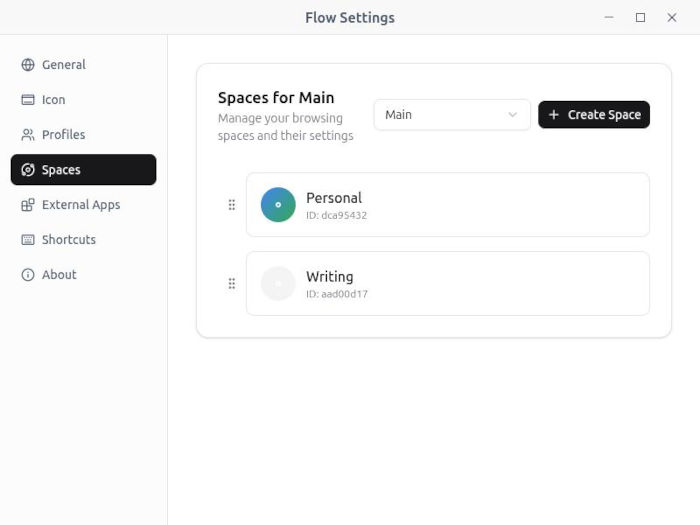
One thing to keep in mind is that Flow is new — it’s been around for less than a year. That means there will be issues. I’ve found switching between Spaces can be a bit hit or miss. Case in point, after being unable to switch between spaces, I had to delete all but the initial space and re-create them. I chalk this up to infancy, but I certainly hope that issue will be fixed. Currently, Flow is on version 0.10.2. When this browser finally reaches general availability, I would imagine it’ll be rock solid.
I’m hoping, once Flow reaches 1.0 status, I’ll be able to make it my daily browser, because it shows a lot of promise. Unlike many other browsers, Flow doesn’t throw a kitchen sink of features at you. Instead, it’s clean, minimal, fast, and well-designed. This browser could easily become the default for many Linux distributions… as long as the developer keeps the updates flowing.
Things I like about Flow Browser… |
Things I don’t like about Flow Browser… |
|---|---|
|
|

Jack Wallen is an award-winning writer for TechRepublic, ZDNET, The New Stack, and Linux New Media. He’s covered a variety of topics for over twenty years and is an avid promoter of open source. Jack is also a novelist with over 50 published works of fiction. For more news about Jack Wallen, visit his website.



Thank You for the article.
Git repo link is missing.
P.S. Kudos for being open on using non-FOSS software, however, writers of opensource magazines are at the forefront of advocacy and should walk-the-walk to be credible or they’d look like environmentalists eating burgers and driving petrol-guzzling cars…. IMHO.
With so many excellent opensource browsers out there (Zen, Helium, Librefox, Mullvad, Brave etc etc) there’s no excuse to support proprietary ones. 🙏
My loyalty is still with Firefox. It does everything that I need on both desktop and phone.
I tried it but…only one search engine that being Google…nope Flow does not work for me…
That’s not a new browser. It’s built on Chrome-shit garbage.
Enjoy your spyware.
You don’t usually “use Chromuim-based browsers”, but your browser of choice has been Opera. Which has been Chromuim-based for more than 5 years.
This looks like a rebrand of Zen. Zen is a fork of Firefox. So you may want to try it instead.
I install it using Flatpak, a huge 3.5GB installation (I’m not a Flatpak fan). Successfully install it, open it, and set up the configuration, but then it displays just white space. I close it and try to open it; nope, no software launch. I restart my OS (Mint 22.3 with 8GB of RAM), and I try to open it, but still no software launches. Maybe my machine has inadequate RAM, or the software knows I’m not a Flatpak fan. So I will reclaim the 3.5Gb disc space.
Addendum: After 2 minutes of writing this comment, Flow appears. I try to browse and try to find the setting menu, which I cannot find.
JXF,
I love Zen Browser. It has one of the best theming engines of all the browsers.
Paijoh,
The settings window is found by clicking the icon at the bottom right corner of the Flow window and then clicking Settings. That icon should be more universal (such as a gear or the three-dot or three-line menu). I hope that helps.
Jack