
Think today’s Gimp is complicated? Try the 1996 Motif version, now resurrected as a Flatpak so you can suffer for nostalgia’s sake.

Gadzooks! I’d completely forgotten what a time suck that figuring out how to use an app used to be.
Tuesday morning I ran across a short article on LWN about Gimp — the open source Linux app that tried for years to be as good as Adobe’s Photoshop, until it finally tried to just be better than itself (at which point it probably became better than Photoshop, in a way).
It seems that Gnome contributor “balooii” wanted you to be able to relive those days of yesteryear, so he used his dev chops to get an old — really, really old — version of Gimp running on modern Linux and metal, and then packaged that up neatly in a Flatpak.
Welcome to the world of Gimp 0.54, which was released 30 years ago, in 1996, long before it was ready for prime time. Gimp 1.0 wouldn’t arrive for another 2 1/2 years, in 1998. It’s also pre-GTK, being the last version built using the Motif toolkit (if you’re under 40, you might want to look that up).
Although I was spending about as much time on a computer back then as I do today, I didn’t take my first look at Gimp — or, “the Gimp” as we then grokked it — until 2002 when I finally grew some gonads and gave Linux (Mandrake) a try.

Download and Install
Given how easy and relatively foolproof flatpaks are, I couldn’t resist the temptation to give it a try. Since I was pretty sure that balooii’s flatpak was largely experimental, and likely to stay that way, I was certain it wasn’t going to be available on FlatHub, so I skipped Bazaar — and Mint’s Software Manager — and followed a link provided by LWN to a Gnome GitLab page:
The easiest way to run the app is to download the flatpak bundle gimp-0.54.1-8.flatpak. On most Linux distributions you can install it by just double-clicking that file. Otherwise, you can install it via flatpak CLI command:
flatpak install --user gimp-0.54.1-8.flatpakAfter installing it you should now find the app GIMP 0.54 in your application launcher. You can also run it from the command line if you prefer:
flatpak run io.github.balooii.gimp054
I tried the double-click recommendation first. I wasn’t sure if it would work, but since Mint natively supports flatpaks these days, I thought it might. It worked, but surprisingly not by calling up Mint’s Software Manager, as I expected, but by opening Bazaar — my preferred tool for managing flatpaks — which asked if I’d like to install the Gimp 0.54 flatpak.
Yup. I would.
Kicking the Tire
Gimp 0.54 was like a unicycle. There’s only one tire.
I say “was,” because even though balooii did a lot of work to make this ancient app that predates the term “open source” run on modern processors, it belongs in the past. Take my word for it; you’re not going to want to use this.

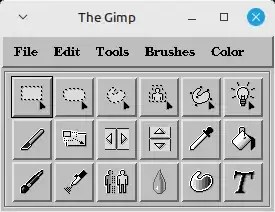
I’ve been using Gimp long enough to know that a prehistoric version wasn’t going to open as a single unified window. I was expecting to see something akin to the classic Gimp from the days of old when the app was something of a three-wheeled unicycle with a Toolbox window, a Layers/Channels/Paths window, and an Image window. What I got was the toolbox window, looking much like the toolbox that continues to reside today in the app’s right sidebar. Once I clicked to open an image, the app became a bicycle (or, perhaps, a Segway), when it opened the Image window.

I thought I was going to enjoy playing around with it — you know one of those reminders of what life was like back in the grand ol’ days when computing was mostly in the command line, and what point-and-click there was, was rudimentary (and found only inside some software programs).
Figuring out how to navigate to a directory to open an image file was maddening. It took maybe 20 minutes of trial-and-error to figure out how to navigate to a directory to open an image, but I did find a cool photo of Spooky Tooth that was hanging out on my hard drive along the way. Two days later, I’d completely forgotten how and would have to teach myself all over again if I wanted to do it again.
Also, figuring out how to get everyday things to work was impossible. I decided I was going to use the rectangle select tool — which is a tool I use several times daily in modern Gimp — to illustrate how it works for this article. I was able to select an area with ease, but after about fifteen minutes I gave up on figuring out how to crop to that selection.
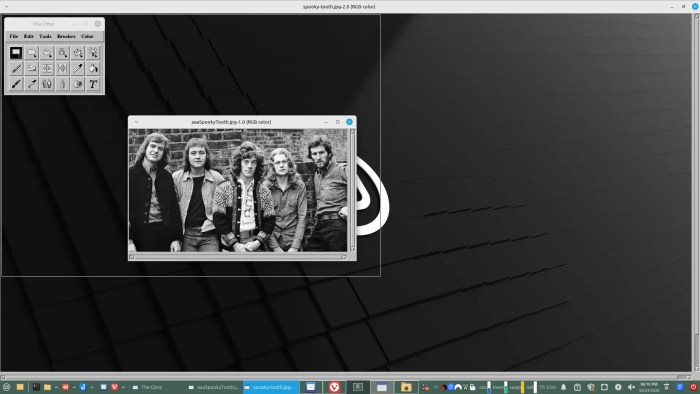
Playing around with it was fun — in a frustrating sort of way — but it mainly served to remind me how much better computing is now than it was back in the days when I was working in DOS with Windows for Workgroups sitting on top.

Christine Hall has been a journalist since 1971. In 2001, she began writing a weekly consumer computer column and started covering Linux and FOSS in 2002 after making the switch to GNU/Linux. Follow her on Twitter: @BrideOfLinux


Great that this guy put together a 1996 version of GIMP, but the real question I have is . . . why?
Probably just to scratch an itch and hone his skills.
Mandrake, 200*!
I was there, going up the learning ladder ’till bootstrapping and compiling Gentoo from ground-up. One week compilation time on my poor student machine. But I choose the most exotic compilation flags which were PRECISELY fitted to my PC!
…one day recompilation at each KDE lib update.
I couldn’t postpone them, they were clearly essential to propel into the future!!
A psychedelic experience.
Now I have a family, so Debian or Ubuntu. 😀
Have a nice day,
Leodp