
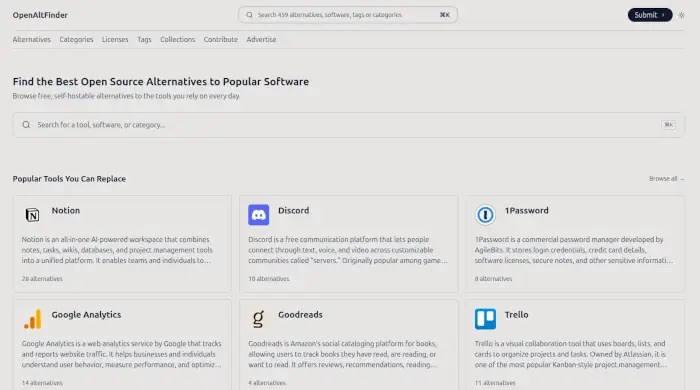
The website pairs proprietary programs with free and open-source replacements, then provides useful details to help users compare their options.
How many times have you needed to do something on a computer, but the only tool you know about for accomplishing the task is proprietary?
Proprietary solutions are usually not the best way to go. When they have a free (as in beer) version, it’s often purposefully crippled, with a fee required to unlock the most useful features. Even after ponying up and paying too much, the software still belongs to the vendor. Users are bound to an end user license agreement that almost always limits their use of the software.
These days, there’s likely to be an open source alternative for any proprietary software you’re using. The problem is in finding it.
Not to worry. There’s an app for that. I recently discovered a free web app called OpenAltFinder.
It’s pretty simple. All you have to do is type in the name of a proprietary app you’d like to replace and it’ll supply you with a list of open source apps with similar features. The replacement might not be exact, and there might be a learning curve involved, but it’ll be a freely available open source app that’ll keep you in charge of your computer, instead of turning it over to Adobe, Microsoft, Google, and all the other brand names.

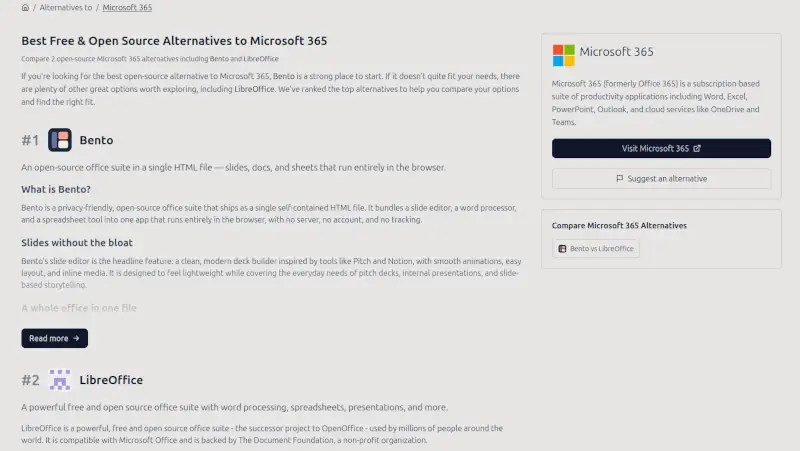
How easy to use is it? When I typed “Microsoft 365” into the provided text box, “LibreOffice” and “Bento” quickly popped up as suggestions. Two great choices. Well-known LibreOffice offers an across-the-board replacement for MS Office that installs on your local machine. Lesser known Bento is also a complete office suite, but bundled up in a single file.
The project is the brainchild of a developer named Wouter, who’s also behind projects such as PixZap, a WhatsApp-based AI photo editing tool; Bluemesh, for AI-assisted Bluesky post generation, scheduling, and monitoring; and Pinned, which offers curated, location-based maps and recommendations.
In an email exchange a few weeks back, Wouter told me that he started this project a little over a year ago, “because I wanted to keep up to date with OSS.” After getting some positive feedback on Reddit, he added, he decided to continue developing it.
“Originally I was just focused on adding content to the site. Only since late January I started to focus on really building it out and adding more features to make it easier to find alternatives,” he said.
Helping to Make Informed Decisions
It’s somewhat amazing that Wouter has only been working on adding features for about seven months, because the platform is rich with nicely laid-out informational features.

For example, after I queried for an open source alternative for Microsoft 365, I clicked on LibreOffice and was taken to an easy to understand page on the OpenAltFinder’s website that offers more than enough information about the office suite to help even an inexperienced user determine whether or not it might fit the bill. Its listing, for example, opens with a brief text thumbnail explaining what the software does, and lists a couple of apps that the software is an “open source alternative to.”
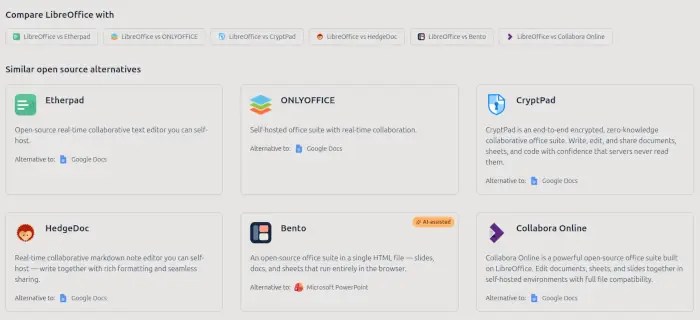
After that, there are several paragraphs describing the software, a section of FAQs, a section headed “Compare LibreOffice with,” with links to onsite pages comparing the software with similar projects. Immediately below that is another section with links to OpenAltFinder pages to each of the apps on the “compare” list.
OpenAltFinder Going Forward
Lately, Wouter has been having to work to get the word out about the site. He says it’s been delisted by Google, and although he said he doesn’t know why, it might be because of the platform’s De-Google Your Life section, which is described as “a curated collection of open source and privacy-focused alternatives to Google’s products.” The section offers open source alternatives to Gmail, Google Drive, Maps, Android, and more, “with tools that respect your data and give you greater control over your digital life.”
He’s also evidently looking for ways to keep the server online and the bills paid. Use of the platform is “completely free at the moment, but because the site is growing, it’s also taking up a lot of my time, hence why I’m trying to find at least some sponsors/advertisers.”
“OpenAltFinder itself isn’t open-source yet,” he said when I asked, “although I’m thinking about how I can do that.” All the data, however, is published on GitHub and is updated daily.

Editor’s note: This project was brought to our attention by the project’s creator using our Contact Us form. If you have an open source project, tell us about it. Access to the form can be found just below our masthead on every page on our site.

Christine Hall has been a journalist since 1971. In 2001, she began writing a weekly consumer computer column and started covering Linux and FOSS in 2002 after making the switch to GNU/Linux. Follow her on Twitter: @BrideOfLinux


