
Kagi’s privacy-focused, WebKit-based browser arrives for Linux as a not quite completely open source beta — with features galore and an opt-in user-funded business model.

Orion is yet another new browser on its way to Linux.
These days, with the spate of agentic AI browsers springing up that’s not necessarily news. The difference here is that this one just wants to be a browser — not an AI agent that wants to run your computer and your life. It’s also based on the open source WebKit layout/rendering engine that runs Safari, instead of Gecko or Blink (the open source engines behind Firefox and all Chromium-based browsers respectively).
It’s new to Linux — in fact so new that it really hasn’t arrived yet, having just been released in beta — although it’s well tested in Apple’s gated garden where it’s already had its production release. That makes the macOS port, as well as the iOS and iPadOS versions, the most full-featured versions of the software. It’s also gaining traction, at least on Apple mobile devices where it already has more than 4 million users, according some figures we’ve seen.
The browser is from Kagi, whose search engine doesn’t accept advertising or collect user data, so it’s big on protecting user privacy and is unlikely to ever cut a deal to send search traffic to Google or worse.
On the downside, Orion’s whole kit and caboodle isn’t open source. Kagi says that’s because the process of forking WebKit, porting hundreds of APIs, and writing the browser application exhausted the capacity of its small team of developers. It’s begun open-sourcing some components and says it plans for more of the browser to be released under open source licenses later. We’ll see…

That being said, our go-to browser here at FOSS Force is Vivaldi, which also isn’t completely open source. However, we trust the developers, like its features, and find that it uses fewer resources than open source Firefox. We would prefer the open source Brave browser, but we have issues about its in-your-face approach to crypto-currency.
So far, the Kagi people haven’t done anything to arouse our suspicions. For over a year we used their search engine and still think it’s about the best. We only dropped it for budgetary reasons.
Orion’s Features
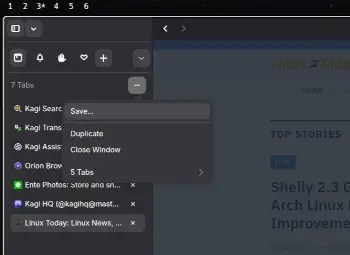
We haven’t tried Orion yet — we’re waiting for a release candidate so we can do a review — but from what we see, it looks like something of a cross between security- and privacy-focused Brave and feature rich Vivaldi. On the security and privacy side, the browser comes with built-in ad and tracker blockers. It also has a “zero telemetry” policy. There’s no phoning home with browser-use data, so no stream of usage analytics.
The feature side also looks rich. Included out-of-the-box there’s a built-in PDF reader, pinned tabs, vertical tree tabs, tab groups, and Compact Mode, which shrinks the address bar for more content space. In addition, there’s Focus Mode, which hides the entire interface to remove distractions, and a Tab-Group Switcher, which offers a visual preview of every open tab when you switch. Like most browsers these days, there’s also a customizable sidebar, which offers quick access to open tabs, bookmarks, windows, and reading lists.
Under the Hood
Kagi says there’s also been a lot of effort spent under the hood to offer a problem-free browser experience. This includes:

- Lightning Fast Performance: The developers say they have benchmarks to prove it and attribute it to the high-performance WebKit rendering engine. “Orion outperforms every browser while blocking ads and trackers by default.”
- Easy on Resources: Orion’s devs say it uses half the memory of Safari, and it’s even better when compared with Chrome.
- Monthly Improvements: Not only does Orion promise frequent updates, they say that they’re heavy on documentation. “Browse through months of improvements, community-requested features, and the occasional ‘we fixed that weird bug you found.'”
Sounds good. Of course, it has to. If you’re in the crowded browser market, performance is a must.
Keeping the Lights On
That brings us to the question of how this is being funded. Kagi’s hoping to make Orion user supported, on an opt-in basis. For at least the time being, there’s no charge for downloading and installing the browser, nor does a countdown clock start running on a free trial period. The plan is to make it free forever by way of a volunteer subscription plan.
If the browser works as advertised, the asking prices aren’t bad: $5 monthly, $50 yearly, or a one-time $150 payment makes you a full-fledged patron. There’s also a pay what you want tip jar. Subscribers get a few perks, including access to release candidates, experimental features, cosmetic options, enhanced feedback/community participation, and advanced functionality that might be added over time.
Take ‘er for a Spin
Being a beta, Orion isn’t yet available through Flathub or app stores. However, it is available as a Flatpak from Orion’s website for folks whose machines are Flatpak ready. To download and install, all you need do is open a terminal and run the following commands…
Step 1: Add the Orion Beta repository

flatpak remote-add --if-not-exists orion-beta https://flatpak.orionbrowser.com/orion-beta.flatpakrepo
Step 2: Install Orion
flatpak install orion-beta com.kagi.Orion
With that done, your installation is complete. The following two steps are optional.
Update an existing installation:

flatpak update com.kagi.Orion
Determine the latest version of Orion:
flatpak remote-info orion-beta com.kagi.Orion
Happy browsing!

Christine Hall has been a journalist since 1971. In 2001, she began writing a weekly consumer computer column and started covering Linux and FOSS in 2002 after making the switch to GNU/Linux. Follow her on Twitter: @BrideOfLinux


“in-your-face approach to crypto-currency.” ???
If you haven’t mentioned it, I wouldn’t even remember it’s there. But:
1) It can easily be disabled with one click and it disappear from your “face” 😛. It’s 100% your choice and it’s not intrusive or insisting at all.
2) There’s a version of Brave called Brave Origin which is stripped from these “in-your-face” options.
3) It makes absolutely no sense to me that you are a FOSS magazine, and thus at the forefront of the movement, and yet use closesource code when you have so many opensource alternatives available.
If you truly believe in opensource, you walk the walk. Otherwise you are just being hypocritical and paying lip service IMO.
I have to chime in here. FOSS FORCE using closed source software even though true floss alternatives exist. Very strange.
Helium Browser is a better open source alternative!