
The FOSS Force Linux App of the Week — Warehouse
Kanri is a fast, open source Kanban app for Linux that keeps your projects on your desktop. Learn how to install it and start managing tasks locally in minutes.

Kanri is a stellar option for those who want a locally-installed Kanban board. If you’re not familiar with them, a Kanban board is a visual project management tool for helping teams or individuals organize and track a project through its various stages.
I use Kanban boards for a lot of projects, ranging from artistic endeavors to client work and more. They make keeping projects moving forward a breeze because they are simple to use, offer just the right amount of features, and can often be used either in a cloud service or locally, although Kanri is designed for local use.
If I have projects that only I work on, you can bet I’ll use a locally-installed option. Why? I don’t always want a third party to have access to my data. That may sound a bit on the paranoid side, but I find it’s always better to be safe than sorry.
For the Linux desktop, one of my favorite Kanban boards is Kanri, which is released under the GPLv3 license and is available for Linux, macOS, and Windows.
Given this is a locally-installed Kanban board, you won’t find some of the features that exist in the likes of Trello, a feature-rich, online Kanban SaaS platform optimized for collaboration. With Kanri, you can’t sync boards across devices, but you can import from Kanri, Trello, and GitHub Project, and you can export either individual boards or do a full export. With the import/export option, you can always export from one desktop and then import it to another.
With Kanri, you can create as many boards as you need, and in those boards you can create as many columns and cards as required for your projects. Kanri also features background images, tags, a search feature, board pinning and duplication, themes (including custom), animations, and autostart.
Installing Kanri
Installing Kanri on Linux is straightforward. You can either opt to use the AppImage option or the binary installers that are available for Debian-based systems such as Ubuntu and others running on x86-64, arm64, and armhf. Download the AppImage or installer from the official Kanri download page and get ready to install. Here’s how:
- AppImage: If you go the AppImage route, I would suggest also using the Gear Lever app which adds a launcher to your desktop menu, so you don’t have to run the app from the command line every time.
- Deb file: Just download the deb file for your architecture, open your terminal window, and issue the command from within the folder housing the file:
sudo dpkg -i kanri*.deb.
Once installed, you’ll find the launcher in your desktop menu.
Using Kanri
If you’ve ever used a Kanban board, you’ll feel right at home with Kanri. If you’ve never used one, there really isn’t much of a learning curve. Essentially, it boils down to this:
- Create a board for your project.
- Create columns for your board (such as To Do, Doing, Done — or whatever the project needs).
- Add cards to the necessary columns.
- As you finish a task, move the card for that task from one column to another (if applicable).
- When a card finally gets to the Done column (again, if applicable), you can delete it.
Within a card, you can do the following:

- Set a due date
- Add sub-tasks
- Add tags
- Set the card color
In other words, editing a card in Kanri is self-explanatory.
Exporting/Importing
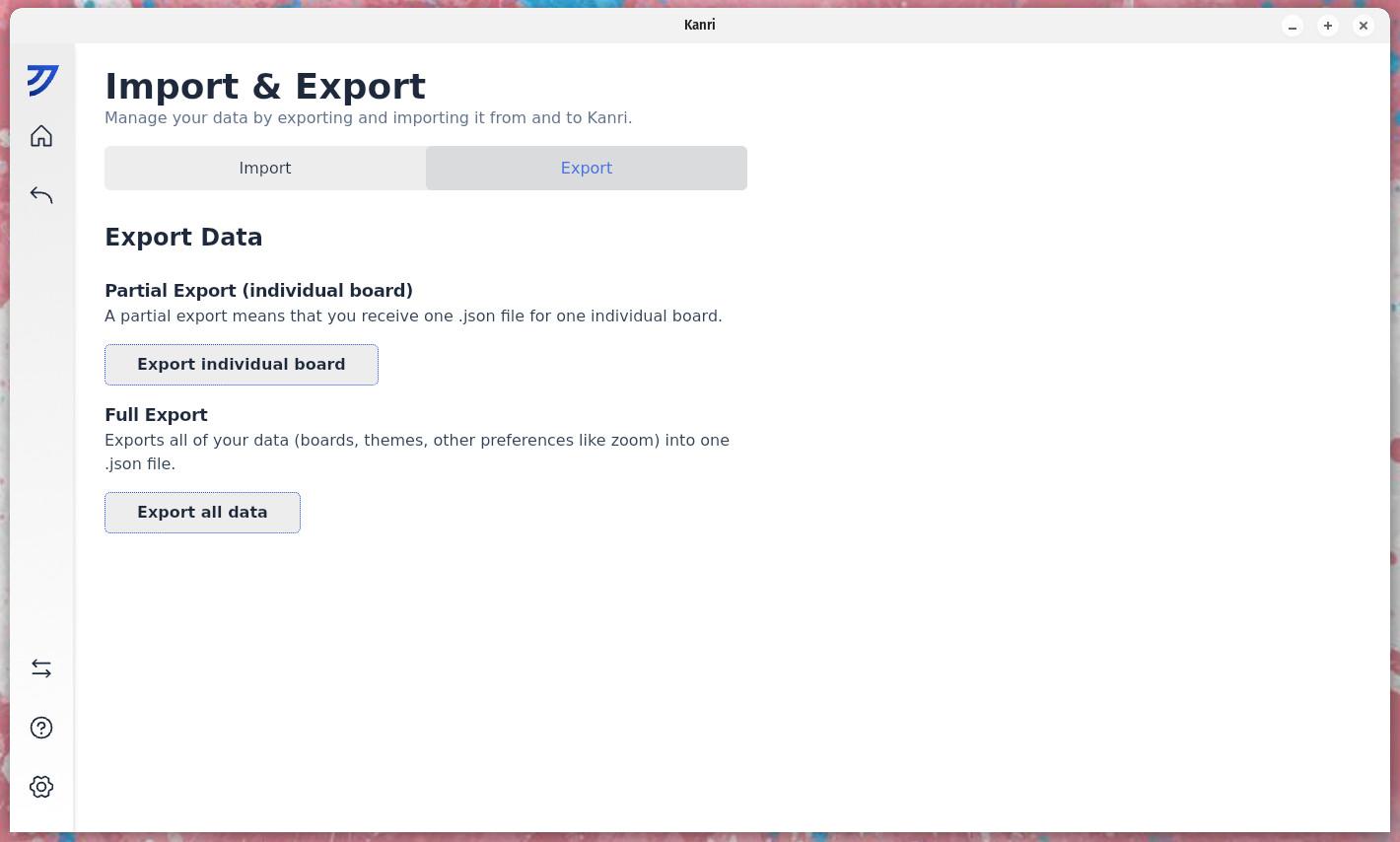
Let’s say you have Kanri installed on multiple desktops and you want to export from one and import to another. Here’s how that’s done:
Exporting
- Open Kanri on the desktop used for the export and click the gear icon at the bottom left of the window.
- Click the right/left pointing arrows in the left sidebar.
- Click the Export tab.
- Click either “Export individual board” or “Export all data.”
- Save the .json file.
Importing
- Copy the .json file to the desktop used for the import.
- Open Kanri on the second desktop.
- Click the right/left pointing arrows in the left sidebar.
- Click the Import tab.
- Click “Import from Kanri” (either under “Partial” or “Full import,” depending on what you exported).
- Locate the exported file and click Open.
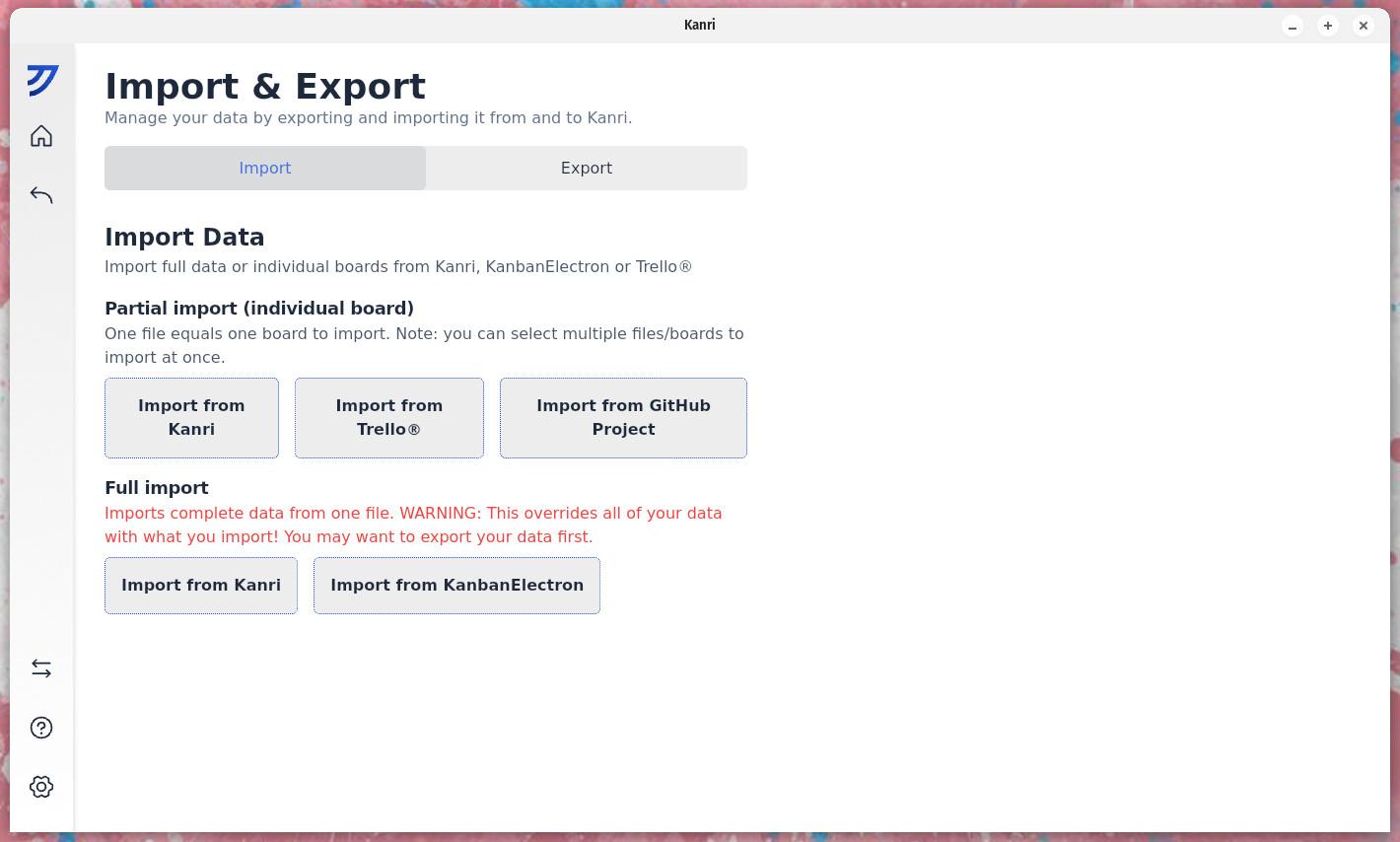
The import should happen very quickly, and you’ll have either the board you exported or all of your boards available on the second machine.

If you need a locally-installed Kanban board on your Linux desktops, you’d be hard-pressed to beat Kanri. Give it a try and see if it doesn’t meet your local project management needs.

Jack Wallen is an award-winning writer for TechRepublic, ZDNET, The New Stack, and Linux New Media. He’s covered a variety of topics for over twenty years and is an avid promoter of open source. Jack is also a novelist with over 50 published works of fiction. For more news about Jack Wallen, visit his website.


